Markdown Studio
Draft with AI, file with confidence. A free Markdown viewer and Notion-style WYSIWYG editor that turns plain-text drafts into polished PDFs — branded reports, technical specs, and court-compliant filings.
Windows (MSI / setup.exe / portable) · Linux (.deb / tar.gz) · Android APK · macOS · iOS — free for non-commercial use
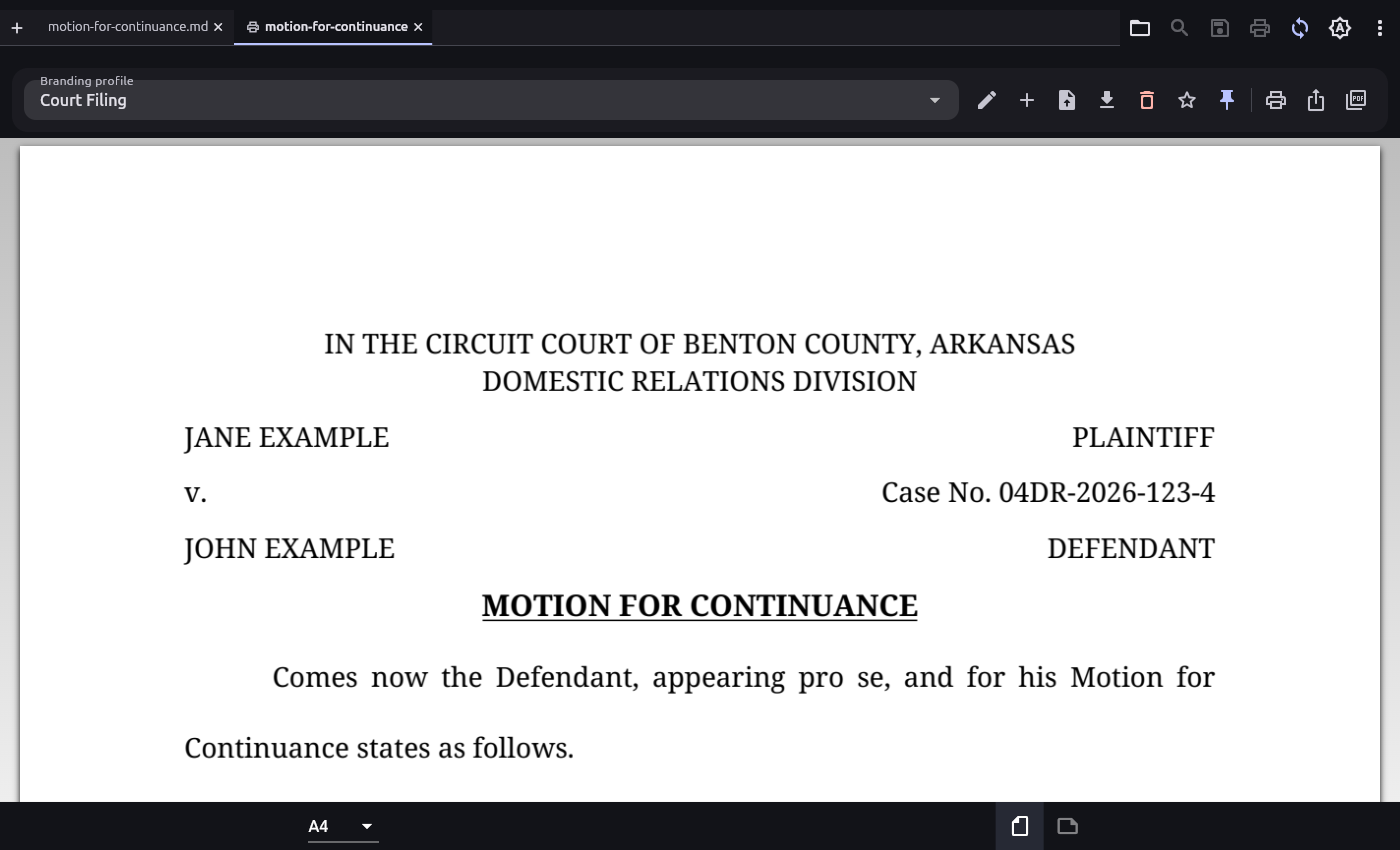
A plain-Markdown motion, printed with the built-in Court Filing profile: centered court header, margin-to-margin caption, 12pt double-spaced justified body, certificate of service on its own page. (read the Markdown source · raw .md → the printed PDF)
Why it exists
AI assistants read and write Markdown far better than any other format — but the world wants finished PDFs. Markdown Studio is the missing last step: keep the source in Markdown, let the AI do the drafting, pick a profile, print. Born from a real pro se litigant's workflow, where filings must follow strict formatting rules that no Markdown tool could produce.
Highlights
Four view modes
Notion-style WYSIWYG editing, split source + live preview, raw source, and read-only preview.
Print & PDF studio
Per-document branding profiles — fonts, colors, logos, headers/footers, watermarks — in a print-preview tab. Profiles are plain JSON an AI can generate.
Court-filing mode
Uniform 12pt, double-spaced, justified, first-line indents, monochrome; text flows continuously across pages like a real pleading.
Forms in Markdown
Fill-in blanks, signature lines, two-column captions, and forced page breaks via a small inline-HTML subset.
Editor comforts
Multi-document tabs, find & replace, drag & drop, auto-reload of external changes, light/dark themes.
Free & source-available
PolyForm Noncommercial license — free for personal, research, and other non-commercial use, with the full source on GitHub.
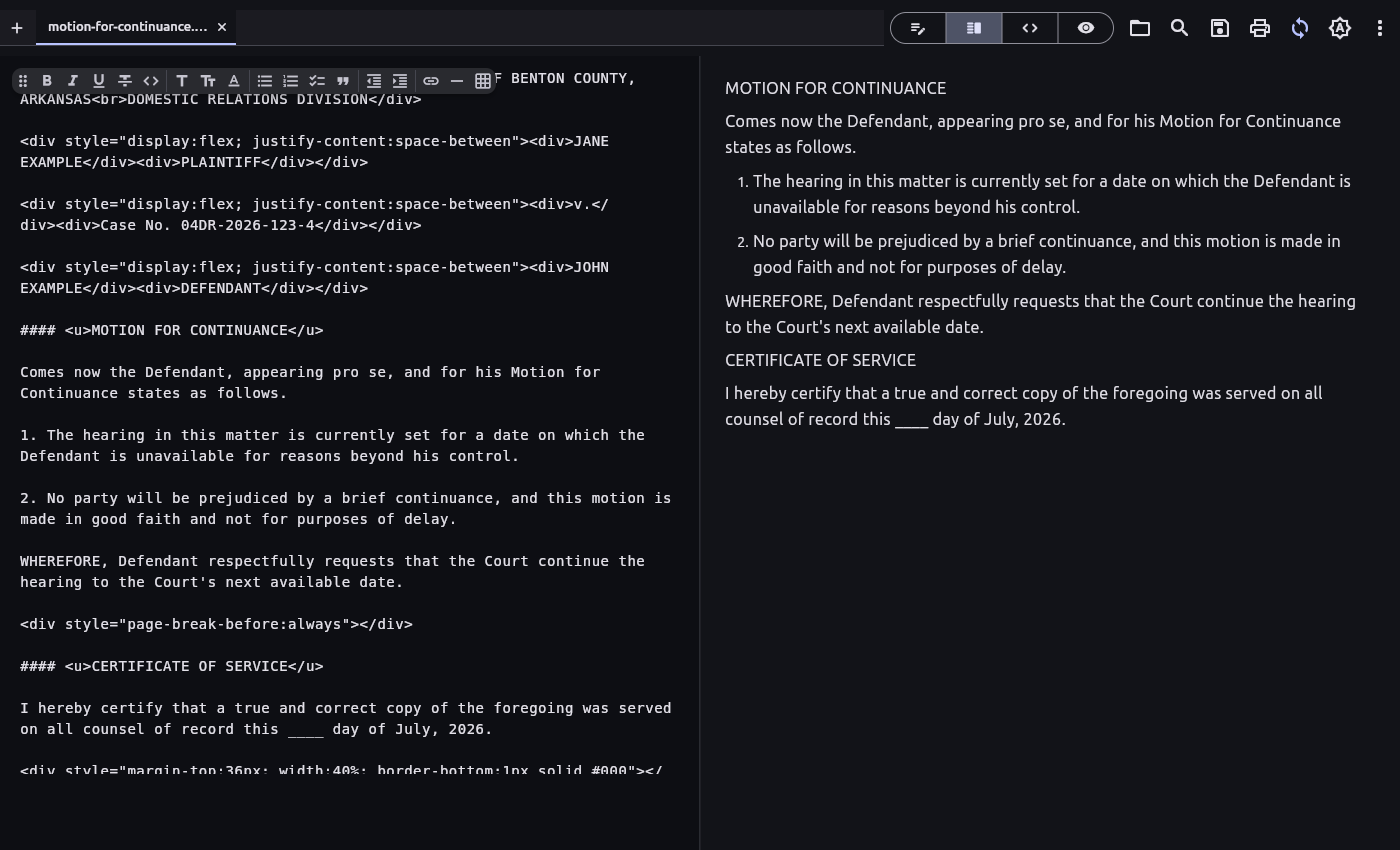
Split view — raw Markdown with the floating format toolbar, live preview beside it.
Common questions
Is it free?
Yes — free for personal, research and other non-commercial use (PolyForm Noncommercial), source on GitHub.
Can it really format court filings?
Yes — 12pt double-spaced justified body, captions, signature lines, page breaks. See the printed sample. Always check your local court's rules.
Does it work with AI assistants?
That's the point: assistants draft the Markdown, Studio prints it. Templates are JSON an AI can generate for you.
Which platforms?
Windows, Linux, Android, macOS and iOS — one codebase, native builds on every release.
Get it
| Windows | MSI installer · setup.exe · portable zip |
|---|---|
| Linux | .deb package · portable tar.gz |
| Android | APK (signed) |
| macOS | app zip (unsigned — right-click → Open) |
| iOS | unsigned IPA (sideload) |
Windows, from a terminal:
winget install TheSaltyKorean.MarkdownStudio
Install notes ship with every release.
Guides
Markdown to PDF
Convert Markdown to a PDF with a logo, header and footer, page numbers, a watermark, and your own fonts.
ChatGPT / Claude output to PDF
Paste an AI assistant's Markdown answer and print it as a clean, branded PDF with selectable text.
Court filings from Markdown
A pro se guide: caption, 12pt double-spaced body, signature line, and certificate of service.
Print & branding profiles
Templates, every field explained, colour/font tables, worked examples — from personal notes to court filings.
Fill-in lines & inline HTML
Signature lines, fill-in blanks, redactions, two-column captions, and forced page breaks in printed PDFs.
AI profile authoring
A copy-paste prompt so any AI assistant generates an importable print template from plain English.
Roadmap
What is planned next for the editor, print profiles, and platform support.